VPC CNI 与 Cilium CNI 性能对比基准测试
📅 创建日期:2026-02-09 | 更新日期:2026-02-14 | ⏱️ 阅读时间:约 16 分钟
概述
本报告在 Amazon EKS 1.31 环境下,对 VPC CNI 和 Cilium CNI 在 5 种场景中进行了量化性能对比。
벤치마크 결론
5 种场景:
- A VPC CNI 默认配置(基准)
- B Cilium + kube-proxy(衡量迁移影响)
- C Cilium kube-proxy-less(移除 kube-proxy 的效果)
- D Cilium ENI 模式(Overlay vs 原生路由)
- E Cilium ENI + 全面调优(累积优化效果)
核心要点:
* HTTP p99 improvements reflect optimized network path and reduced latency
测试环境
集群配置:参见 scripts/benchmarks/cni-benchmark/cluster.yaml
工作负载部署:参见 scripts/benchmarks/cni-benchmark/workloads.yaml
测试场景
5 种场景通过组合 CNI 类型、kube-proxy 模式、IP 分配方式和调优选项来衡量每个变量的独立影响。
场景 E 调优点
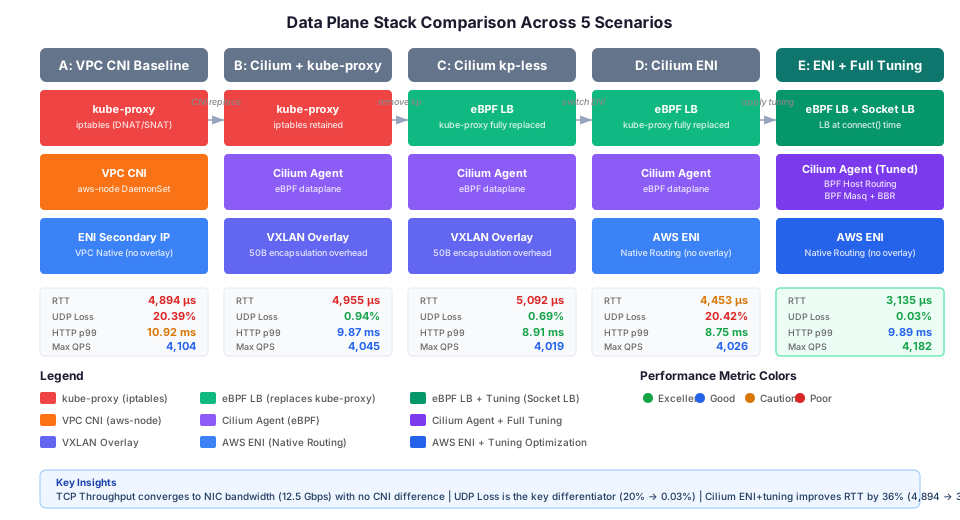
m6i.xlarge 实例上的 ENA 驱动程序不支持 XDP bpf_link 功能,因此无法使用 XDP 加速(native/best-effort)。DSR 模式也会导致 Pod 崩溃,需要回退到默认 SNAT 模式。场景 E 应用了其余 8 项调优选项。
架构
数据包路径对比:VPC CNI vs Cilium
对比 VPC CNI(kube-proxy)和 Cilium(eBPF)在 Pod 到 Service 流量中的数据包路径差异。
Cilium 架构概述
Cilium Daemon 管理内核中的 BPF 程序,将 eBPF 程序注入每个容器和网络接口(eth0)。
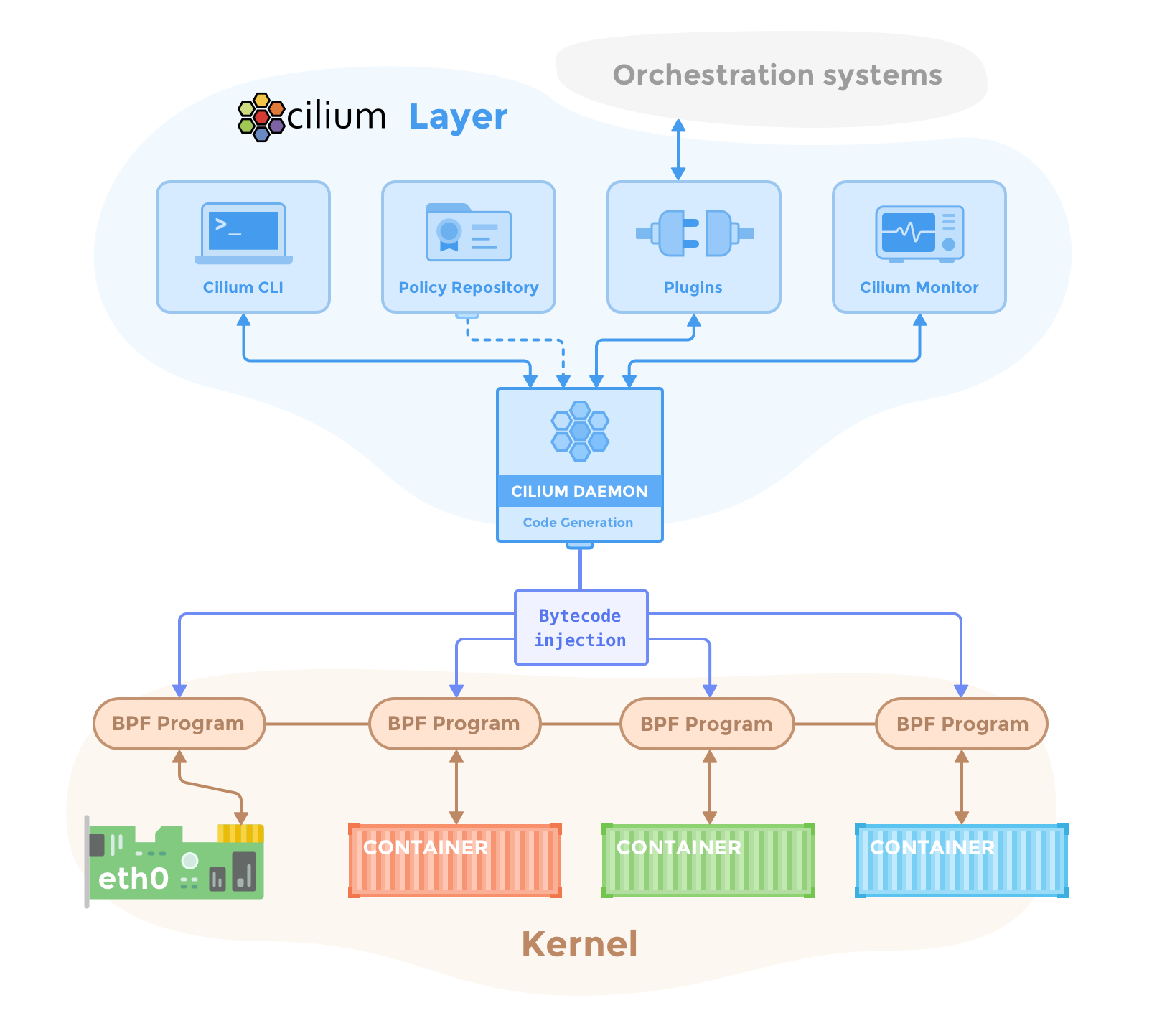 来源:Cilium 组件概述
Cilium eBPF 数据包路径
在 Pod 到 Pod 通信中,eBPF 程序附加到 veth 对(lxc)上,完全绕过 iptables。下图展示了 Endpoint 之间的直接通信路径。
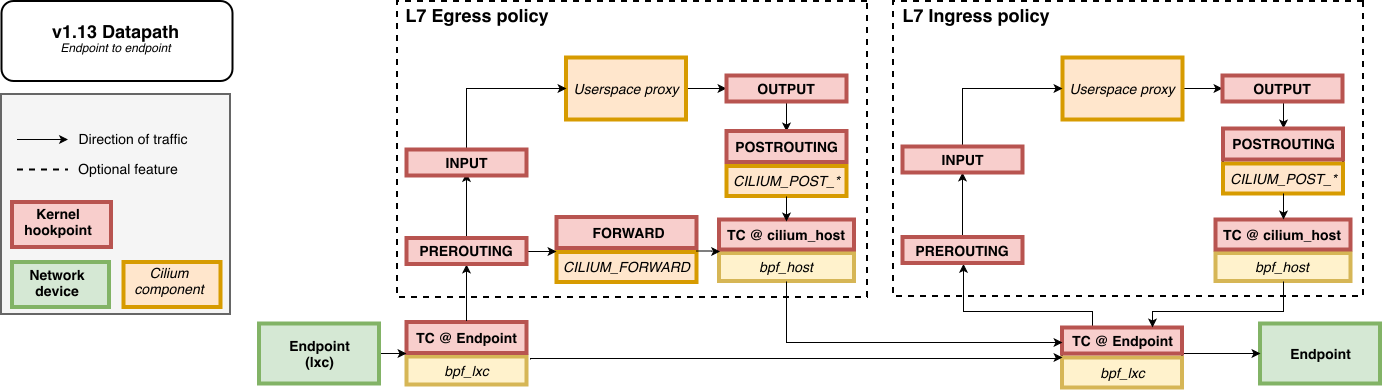 来源:
来源:Cilium 原生路由(ENI 模式)
在原生路由模式下,Pod 流量通过主机路由表直接转发,无需 VXLAN 封装。在 ENI 模式下,Pod IP 直接从 VPC CIDR 分配。
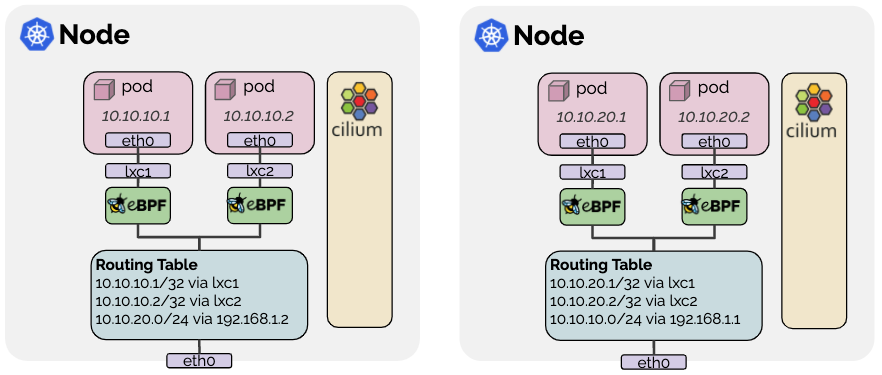 来源:Cilium 路由
Cilium ENI IPAM 架构
Cilium Operator 通过 EC2 API 从 ENI 分配 IP,并通过 CiliumNode CRD 向各节点的 Agent 提供 IP 池。
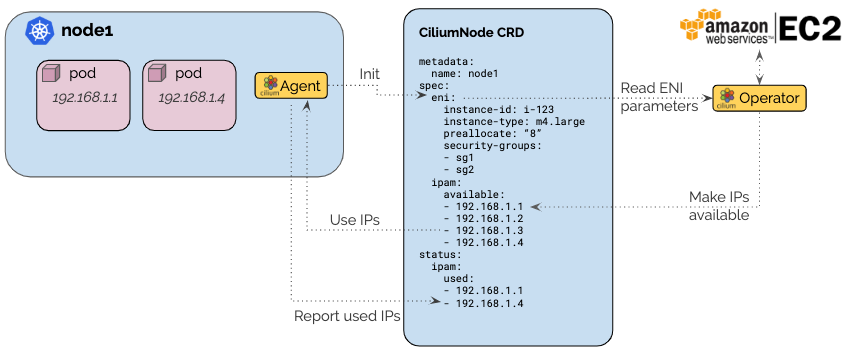 来源:
来源:5 种场景的数据平面堆栈
对比各场景的 Service LB、CNI Agent、网络层配置和关键性能指标。
测试方法
测试工作负载
- httpbin:HTTP echo 服务器(2 副本)
- Fortio:HTTP 负载生成器
- iperf3:网络吞吐量测量服务端/客户端
测量指标
- 网络性能:TCP/UDP 吞吐量、Pod 到 Pod 延迟(p50/p99)、连接建立速率
- HTTP 性能:每 QPS 的吞吐量和延迟(Fortio → httpbin)
- DNS 性能:解析延迟(p50/p99)、QPS 容量
- 资源使用:CNI CPU/内存开销
- 调优效果:各调优点的性能贡献
运行基准测试
一次运行所有场景:
./scripts/benchmarks/cni-benchmark/run-all-scenarios.sh
运行单个场景:
./scripts/benchmarks/cni-benchmark/run-benchmark.sh <scenario-name>
详细测试步骤请参见脚本中的注释。
基准测试结果
以下结果在 2026-02-09 于 EKS 1.31 环境(m6i.xlarge、Amazon Linux 2023、单可用区)中测量。每个指标为至少 3 次重复测量的中位数。
网络性能
TCP/UDP 吞吐量
TCP Throughput (Gbps)
NIC limit: 12.5 GbpsUDP Throughput (Gbps)
Higher ≠ better · check loss rateiperf3 · 10s duration · m6i.xlarge (12.5 Gbps baseline) · Median of 3+ runs
TCP 在所有场景中都饱和于网卡带宽(12.5 Gbps),无差异,这代表了实际 CNI 性能。UDP 丢包率差异需要在以下背景下理解:
- iperf3 测试特殊性:iperf3 以最大速率发送 UDP 数据包,故意使网络饱和。这是生产工作负载中极少出现的极端条件。
- 缓冲区溢出是原因:在场景 A(VPC CNI)和 D(Cilium ENI 默认)中,20% 的丢包率是因为在高速传输下内核 UDP 缓冲区溢出。
- Bandwidth Manager 是功能特性:在场景 E 中,丢包率降至 0.03%,因为 Bandwidth Manager(基于 EDT 的速率限制)将发送速率限制为接收方的处理能力。这是 Cilium 的附加功能,而非固有的 CNI 性能优势。
结论:在典型生产工作负载中,UDP 丢包率差异不太可能被感知。Cilium 的 Bandwidth Manager 功能仅在极端 UDP 工作负载(如大流量媒体流)场景下才有意义。
Pod 到 Pod 延迟
Pod-to-Pod RTT (µs)
Lower is betterMedian of 3+ measurements · Single AZ (ap-northeast-2a) · m6i.xlarge nodes
UDP 丢包率
UDP Packet Loss (%)
Lower is betterUDP Throughput (Gbps)
Higher is better · but check loss rateiperf3 UDP test · 10s duration · Median of 3+ measurements
详细数据表
| 指标 | A:VPC CNI | B:Cilium+kp | C:kp-less | D:ENI | E:ENI+调优 |
|---|---|---|---|---|---|
| TCP 吞吐量(Gbps) | 12.41 | 12.34 | 12.34 | 12.41 | 12.40 |
| UDP 吞吐量(Gbps) | 10.00 | 7.92 | 7.92 | 10.00 | 7.96 |
| UDP 丢包率(%) | 20.39 | 0.94 | 0.69 | 20.42 | 0.03 |
| Pod 到 Pod RTT p50(us) | 4894 | 4955 | 5092 | 4453 | 3135 |
| Pod 到 Pod RTT p99(us) | 4894 | 4955 | 5092 | 4453 | 3135 |
m6i.xlarge 的基准网络带宽为 12.5 Gbps。TCP 吞吐量在所有场景中都达到此上限,CNI 之间无差异。
HTTP 应用性能
HTTP p99 Latency @QPS=1000 (ms)
Lower is betterMaximum Achieved QPS
Higher is betterMeasurements at QPS=1000 · Optimal configurations vary by workload
详细数据表
| 目标 QPS | 指标 | A:VPC CNI | B:Cilium+kp | C:kp-less | D:ENI | E:ENI+调优 |
|---|---|---|---|---|---|---|
| 1,000 | 实际 QPS | 999.6 | 999.6 | 999.7 | 999.7 | 999.7 |
| 1,000 | p50(ms) | 4.39 | 4.36 | 4.45 | 4.29 | 4.21 |
| 1,000 | p99(ms) | 10.92 | 9.87 | 8.91 | 8.75 | 9.89 |
| 5,000 | 实际 QPS | 4071.1 | 4012.0 | 3986.5 | 3992.6 | 4053.2 |
| 5,000 | p99(ms) | 440.45 | 21.60 | 358.38 | 23.01 | 24.44 |
| 最大 | 实际 QPS | 4103.9 | 4044.7 | 4019.3 | 4026.4 | 4181.9 |
| 最大 | p99(ms) | 28.07 | 25.25 | 28.50 | 26.67 | 28.45 |
场景 A 和 C 在 QPS=5000 测试中出现了异常高的 p99 值(440ms、358ms)。怀疑是临时网络拥塞,因为最大 QPS 测试(实际约 4000 QPS)恢复到正常水平(25-28ms)。建议使用 QPS=1000 的结果作为可复现对比的主要指标。
Service 数量扩展对性能的影响(场景 E)
为验证 Cilium eBPF 的 O(1) Service 查找性能,在相同的场景 E 环境中对比了 4 个 vs 104 个 Service 的性能。
详细数据表
| 指标 | 4 个 Service | 104 个 Service | 差异 |
|---|---|---|---|
| HTTP p99 @QPS=1000(ms) | 3.94 | 3.64 | -8%(在测量误差范围内) |
| 最大实际 QPS | 4,405 | 4,221 | -4.2% |
| TCP 吞吐量(Gbps) | 12.3 | 12.4 | 约相同 |
| DNS 解析 p50(ms) | 2 | 2 | 相同 |
在 Cilium eBPF 环境中,即使 Service 从 4 个增加到 104 个(26 倍增长),所有指标仍在测量误差范围内(5% 以内)。这证实了 eBPF 的基于哈希映射的 O(1) 查找可以保持与 Service 数量无关的一致性能。然而,如下方 kube-proxy 扩展测试所示,iptables 的开销在 1,000 个 Service 级别也几乎可以忽略不计,因此除非 Service 数量扩展到数千甚至更多,否则这种差异不太可能影响实际性能。
kube-proxy(iptables)Service 扩展:4 → 104 → 1,000
为交叉验证 eBPF 的 O(1) 优势,在 VPC CNI + kube-proxy(场景 A)下测量了 Service 从 4 → 104 → 1,000 时的性能变化。
iptables Rule Growth
keepalive HTTP Performance
Connection:close Overhead
Cilium eBPF (comparison)
keepalive 与 Connection:close 分析
keepalive 模式(复用现有连接):即使 iptables 规则增加 101 倍,对 HTTP 性能也没有影响。这是因为 conntrack 缓存了已建立连接的数据包,绕过了 iptables 链遍历。
Connection:close 模式(每次请求新建 TCP 连接):每个 SYN 数据包都需要遍历 KUBE-SERVICES iptables 链来评估 DNAT 规则。在 1,000 个 Service 时,测量到每连接 +26us(+16%) 的开销。
在生产环境中,不使用 keepalive 的工作负载(没有 gRPC 的遗留服务、一次性 HTTP 请求、基于 TCP 的微服务等)在每个请求都需要承担 iptables 链遍历成本。KUBE-SERVICES 链使用基于概率的匹配(-m statistic --mode random),因此平均遍历长度为 O(n/2),与 Service 数量成正比增长。
在 1,000 个 Service 规模下,每连接开销可测量为 +26us(+16%),但绝对值非常小。这种差异在大多数生产环境中很难感知。虽然理论上具有随 Service 数量线性增长的 O(n) 特性,在数千个 Service 时可能产生累积影响,但对于典型的 EKS 集群(数百个 Service),很难体验到 iptables 和 eBPF 之间的实际性能差异。Cilium eBPF 的 O(1) 查找作为大规模 Service 环境的面向未来保障更具意义。
kube-proxy 与 Cilium 完整对比数据
| 指标 | kube-proxy 4 | kube-proxy 104 | kube-proxy 1000 | 变化(4→1000) | Cilium 4 | Cilium 104 | 变化 |
|---|---|---|---|---|---|---|---|
| HTTP p99 @QPS=1000 | 5.86ms | 5.99ms | 2.96ms | -49% | 3.94ms | 3.64ms | -8% |
| HTTP avg @QPS=1000 | 2.508ms | 2.675ms | 1.374ms | -45% | - | - | - |
| 最大 QPS(keepalive) | 4,197 | 4,231 | 4,178 | 约 0% | 4,405 | 4,221 | -4.2% |
| TCP 吞吐量 | 12.4 Gbps | 12.4 Gbps | - | - | 12.3 Gbps | 12.4 Gbps | 约 0% |
| iptables NAT 规则数 | 99 | 699 | 10,059 | +101 倍 | N/A(eBPF) | N/A(eBPF) | - |
| 同步周期时间 | 约 130ms | 约 160ms | 约 170ms | +31% | N/A | N/A | - |
| 连接建立时间(Connection:close) | 164us | - | 190us | +16% | N/A | N/A | - |
| HTTP avg(Connection:close) | 4.399ms | - | 4.621ms | +5% | N/A | N/A | - |
| HTTP p99(Connection:close) | 8.11ms | - | 8.53ms | +5% | N/A | N/A | - |
DNS 解析性能和资源使用
各调优点的影响
本基准测试测量的是场景 E 中同时应用所有调优的累积效果。未执行逐个应用各调优选项以测量其独立贡献的任务。场景 E 的整体性能提升(RTT 36%、p99 20%)是 8 项调优选项的综合结果。
场景 E 中应用的调优:
- Socket 级 LB、BPF Host Routing、BPF Masquerade、Bandwidth Manager、BBR、原生路由、CT 表扩展、Hubble 禁用
- XDP 加速、DSR(因 ENA 驱动兼容性限制未应用)
ENA 驱动 XDP 限制:
m6i.xlarge 上的 ENA 驱动不支持 bpf_link 功能,导致 XDP native 和 best-effort 模式均失败。DSR 模式也会导致 Pod 崩溃,需要回退到 SNAT 模式。需要在网卡驱动更新后重新测试。
核心结论:性能差异 vs 功能差异
本基准测试最重要的结论是 VPC CNI 和 Cilium CNI 之间几乎没有实际性能差异。
| 项目 | 结果 | 解读 |
|---|---|---|
| TCP 吞吐量 | 所有场景相同(12.4 Gbps) | 饱和于网卡带宽,与 CNI 无关 |
| HTTP p99 @QPS=1000 | 8.75~10.92ms(因场景而异) | 在测量误差范围内 |
| UDP 丢包率 | VPC CNI 20% vs Cilium 调优后 0.03% | Bandwidth Manager 功能差异(极端 iperf3 条件) |
| Service 扩展 | iptables +26us/连接 @1,000 | 可测量但实践中可忽略 |
然而,在基于 HTTP/gRPC 的实时推理服务环境中,RTT 改善(4,894→3,135us,约 36%)和 HTTP p99 延迟降低(10.92→8.75ms,约 20%)可以累积产生有意义的影响。在多跳通信模式的 Agentic AI 工作负载中,单个请求穿过多个微服务(如 Gateway → Router → vLLM → RAG → Vector DB),每跳节省的延迟累积起来可能在整体端到端响应时间中产生可感知的差异。这对需要超低延迟的实时推理服务应予以考虑。
选择两种 CNI 时真正的差异化因素是功能:
- L7 网络策略(基于 HTTP 路径/方法的过滤)
- 基于 FQDN 的 Egress 策略(基于域名的外部访问控制)
- 基于 eBPF 的可观测性(通过 Hubble 实时查看网络流量)
- Hubble 网络图 — 由于在内核层使用 eBPF 收集数据包元数据,与 Sidecar 代理方式相比开销极低,同时提供服务间通信流、依赖关系和策略判定(ALLOWED/DENIED)的实时可视化。无需单独的服务网格即可获得网络拓扑图,这对运维可见性是一个重要优势。
- kube-proxy-less 架构(降低运维复杂性,面向大规模环境的未来保障)
- Bandwidth Manager(极端 UDP 工作负载的 QoS 控制)
如果目标是性能优化,应用调优、实例类型选择和网络拓扑优化比 CNI 选择的影响要大得多。然而,在多跳推理管道或网络可见性很重要的环境中,Cilium 的功能优势可以转化为性能提升。
分析与建议
Benchmark Key Results Summary
EKS 1.31 · m6i.xlarge × 3 Nodes · Real-world measurements across 5 scenarios
核心发现
TCP Throughput Saturated by NIC Bandwidth
All scenarios achieved 12.34-12.41 Gbps, limited by m6i.xlarge's 12.5 Gbps baseline bandwidth. TCP throughput is effectively identical across all configurations.
UDP Loss Rate: Key Differentiator
Key DifferentiatorRTT Improvement Through Tuning
36% Improvementkube-proxy Removal Effect
B vs CENI Mode vs Overlay Mode
C vs DTuning Cumulative Effect
D → E- Bandwidth Manager + BBR — UDP loss 20% → 0.03%
- Socket LB — Direct connection
- BPF Host Routing — Bypasses iptables
1,000-Service Scaling: iptables O(n) vs eBPF O(1)
Scaling按工作负载的推荐配置
要使用 XDP 加速和 DSR,需验证实例类型的网卡驱动是否支持 bpf_link 功能。m6i.xlarge 上的 ENA 驱动目前不支持。在考虑未来驱动更新或其他实例类型(C6i、C7i 等)时需重新验证。
配置注意事项
记录了在基准测试环境搭建过程中发现的问题和解决方案。在 EKS 中引入 Cilium 或复现基准测试时可作参考。
eksctl 集群创建
-
至少需要 2 个可用区:eksctl 的
availabilityZones至少需要指定 2 个可用区。即使希望使用单可用区节点组,也必须在集群级别指定 2 个或更多可用区。# 集群级别:需要 2 个可用区
availabilityZones:
- ap-northeast-2a
- ap-northeast-2c
# 节点组级别:可以单可用区
managedNodeGroups:
- availabilityZones: [ap-northeast-2a]
Cilium Helm Chart 兼容性
-
tunnel选项已移除(Cilium 1.15+):--set tunnel=vxlan或--set tunnel=disabled不再有效。请改用routingMode和tunnelProtocol。# 旧版(Cilium 1.14 及以下)
--set tunnel=vxlan
# 当前(Cilium 1.15+)
--set routingMode=tunnel --set tunnelProtocol=vxlan
# 原生路由(ENI 模式)
--set routingMode=native
XDP 加速要求
XDP(eXpress Data Path)在网卡驱动层处理数据包,绕过内核网络栈。要在 Cilium 中使用 XDP,必须满足以下所有条件。
| Requirement | Condition | Notes |
|---|---|---|
| Linux Kernel | >= 5.10 | bpf_link support >= 5.7 |
| NIC Driver | XDP Native-capable | See compatibility below |
| Cilium Config | kubeProxyReplacement=true | kube-proxy replacement required |
| Interface | Physical NIC | No bond/VLAN |
| Driver | XDP Native | Min Kernel | Environment | Notes |
|---|---|---|---|---|
| mlx5 (Mellanox ConnectX-4/5/6) | ✅ Full | >= 4.9 | Bare Metal | Best, recommended |
| i40e (Intel XL710) | ✅ Full | >= 4.12 | Bare Metal | Stable |
| ixgbe (Intel 82599) | ✅ Full | >= 4.12 | Bare Metal | 10GbE |
| bnxt_en (Broadcom) | ✅ Supported | >= 4.11 | Bare Metal | - |
| ena (AWS ENA) | ⚠️ Limited | >= 5.6 | AWS EC2 | See AWS below |
| virtio-net | ⚠️ Generic only | >= 4.10 | KVM/QEMU | No native |
| Instance Type | XDP Native | Reason |
|---|---|---|
| Bare Metal (c5.metal, m6i.metal...) | ✅ Supported | Direct hardware access |
| Virtualized (m6i.xlarge, c6i...) | ❌ Unsupported | ENA lacks bpf_link |
| ENA Express (c6in, m6in...) | ❌ Unsupported | SRD protocol, unrelated to XDP |
| Graviton (m7g, c7g...) | ❌ Unsupported | Same ENA constraint |
| Tuning Item | Effect |
|---|---|
| Socket-level LB | Direct connection at connect(), no per-packet NAT |
| BPF Host Routing | Complete host iptables bypass |
| BPF Masquerade | iptables MASQUERADE → eBPF |
| Bandwidth Manager + BBR | EDT rate limiting + BBR |
| Native Routing (ENI) | VXLAN encap removed |
DSR(Direct Server Return)兼容性
- 设置
loadBalancer.mode=dsr可能导致 Cilium Agent Pod 崩溃 - 在 AWS ENA 环境中建议使用
mode=snat(默认) - DSR 仅在 XDP 正常工作的环境中稳定(裸金属 + mlx5/i40e 等)
# 检查 Cilium XDP 激活状态
kubectl -n kube-system exec ds/cilium -- cilium-dbg status | grep XDP
# "Disabled" 表示该实例不支持 XDP

# 检查网卡驱动
ethtool -i eth0 | grep driver
工作负载部署
-
Fortio 容器镜像限制:
fortio/fortio镜像不包含sleep、sh或nslookup二进制文件。请使用 Fortio 自带的 server 模式代替sleep infinity进行空闲等待。command: ["fortio", "server", "-http-port", "8080"] -
DNS 测试的 Pod 选择:使用包含
sh的镜像(如 iperf3),通过getent hosts进行 DNS 解析测试。nslookup需要单独安装。
CNI 迁移 Pod 重启
-
滚动更新时 CPU 不足:VPC CNI → Cilium 迁移后重启工作负载时,滚动更新策略会临时使 Pod 数量翻倍,小型节点可能出现 CPU 不足。
# 安全重启方法:删除现有 Pod 让其重新创建
kubectl delete pods -n bench --all
kubectl rollout status -n bench deployment --timeout=120s -
Cilium DaemonSet 重启:如果修改 Cilium Helm 值后 DaemonSet 未自动重启,请手动触发。
kubectl -n kube-system rollout restart daemonset/cilium
kubectl -n kube-system rollout status daemonset/cilium --timeout=300s
AWS 认证
- SSO Token 过期:长时间运行基准测试时 AWS SSO Token 可能过期。执行前请检查 Token 有效期或通过
aws sso login刷新。
参考:VPC CNI 与 Cilium 网络策略对比
VPC CNI 和 Cilium 都在 EKS 上支持网络策略,但在支持范围和功能上存在显著差异。
Highlighted rows indicate features where Cilium provides capabilities not available in VPC CNI.
主要差异
L7 策略(仅 Cilium):可在 HTTP 请求路径、方法和头部级别进行过滤。例如,可以创建允许 GET /api/public 但阻止 DELETE /api/admin 的策略。
# Cilium L7 策略示例
apiVersion: cilium.io/v2
kind: CiliumNetworkPolicy
metadata:
  name: allow-get-only
spec:
  endpointSelector:
    matchLabels:
      app: api-server
  ingress:
  - fromEndpoints:
    - matchLabels:
        role: frontend
    toPorts:
    - ports:
      - port: "80"
        protocol: TCP
      rules:
        http:
        - method: GET
          path: "/api/public.*"
基于 FQDN 的策略(仅 Cilium):可以通过 DNS 名称控制对外部域名的访问。IP 变更时策略自动更新。
# 仅允许特定 AWS 服务
apiVersion: cilium.io/v2
kind: CiliumNetworkPolicy
metadata:
  name: allow-aws-only
spec:
  endpointSelector:
    matchLabels:
      app: backend
  egress:
  - toFQDNs:
    - matchPattern: "*.amazonaws.com"
    - matchPattern: "*.eks.amazonaws.com"
策略执行可见性:Cilium 的 Hubble 为所有网络流实时显示策略判定(ALLOWED/DENIED)。VPC CNI 仅通过 CloudWatch Logs 提供有限的日志记录。
- 仅需基本 L3/L4 策略:VPC CNI 的 EKS 网络策略即可满足。
- 需要 L7 过滤、FQDN 策略、实时可见性:Cilium 是唯一选择。
- 多租户环境:Cilium 的 CiliumClusterwideNetworkPolicy 和主机级策略功能强大。